A couple of years ago I ran a campaign to push my own Spotify plays with Facebook ads, and I published the numbers. This post is that campaign — how I set it up, what it cost, what it returned — plus what I’d weigh up before doing it again today, because Spotify has since built promotional tools of its own that didn’t exist when I started.
Two things worth saying up front. The campaign figures below are from 2024, so treat them as a shape rather than a quote — advertising costs move. And Meta changes Ads Manager constantly: the buttons, the targeting options and the defaults have all shifted since I ran this. The thinking still holds. The exact clicks may not.
Spotify’s own tools, or ads?
This is the question I’d start with now, and it barely existed when I first wrote this.
Marquee is a full-screen prompt shown to listeners when they open Spotify. Showcase is a banner on the home page. Both are billed per click — and Spotify counts a save as a billable click too — with budgets from $100 to $10,000 ($250 minimum if you book through Spotify’s local representatives). Spotify doesn’t publish a per-click rate, saying it varies by audience and market, so any figure you see quoted elsewhere is someone’s estimate. Marquee delivers over roughly 10 days, Showcase over 14.
The eligibility gates are the part worth knowing before you get attached to the idea:
- Both need at least 1,000 streams in the past 28 days in at least one of your target markets — one clearing the bar is enough, not all of them.
- Both need you credited as a main artist, with no more than four main artists on the release, and it has to be an album, EP or single — no compilations, remasters, re-recordings, karaoke or soundalikes.
- Marquee also needs 5,000 monthly active listeners in your target markets, and the campaign has to start within 21 days of the release date. It’s a new-release tool; you can’t point it at your back catalogue.
Discovery Mode works differently. Nothing to pay up front — you opt songs in and Spotify is more likely to surface them in algorithmic contexts like Radio and Discover Weekly. In exchange Spotify takes a 30% commission on recording royalties from streams generated in those contexts. Everything else you earn is untouched. It isn’t open to everyone either: you need at least three eligible songs and 25,000 monthly listeners, and each song must have been out 30 days with some existing traction in Discovery Mode.
Worth saying that a Spotify Canvas — the looping visual on the now-playing screen — costs nothing and has none of these gates. It won’t promote the track on its own, but it’s the one Spotify surface every artist can use, and it makes the destination look finished when someone does arrive.
The honest comparison: Spotify’s tools reach people already inside the app, one tap from playing your song. Facebook and Instagram ads reach a far larger audience but have to pull someone out of one app and into another, which is where most of the drop-off happens.
The case for ads is what happens when Spotify’s tools are closed to you. If you’re under 5,000 monthly listeners, or past the 21-day window, or promoting something older, Marquee simply isn’t available — and that describes a lot of independent artists most of the time.
The campaign I ran in 2024
Here’s how I set it up. I’m describing what I did at the time rather than what you’ll see on screen today — Meta has reorganised Ads Manager more than once since, so treat this as the reasoning rather than a click path.
A proper ad account, not the Boost button. Boosting a post from your Page is quick and almost always wastes money, because it gives you almost none of the targeting controls. Setting up a business account properly is the difference between spending $20 and learning something, and spending $20 and learning nothing.
Traffic as the objective. I wanted link clicks through to a Spotify song, not video views or engagement, and I picked the objective that optimised for that.
A small daily budget to start. I began at a couple of dollars a day. At that stage you’re buying information, not plays — there’s no point scaling until you know which audience responds.
Location first. Worldwide targeting gets you the cheapest clicks and the worst ones; a large share are bots or accidental taps and you pay for both. I started with a small group of high-income countries — the US, Canada, the UK — and revisited location later, because it’s the single biggest lever on cost.
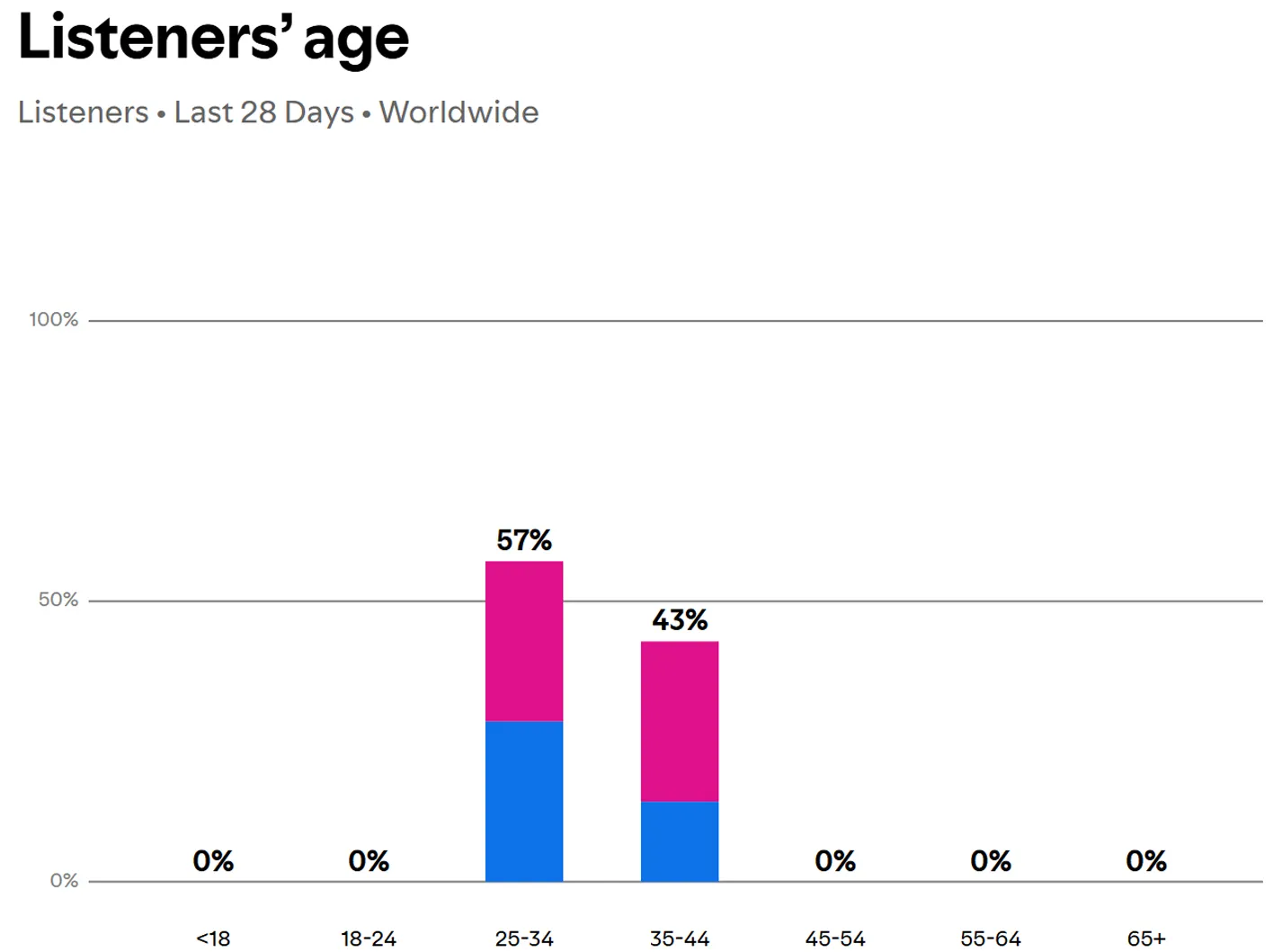
Age from my own data, not a guess. Spotify for Artists shows the age breakdown of your existing listeners. Targeting where you already have traction beats targeting who you wish was listening. For me that was 18–34. I left gender open.
Interests built around Spotify itself. I targeted people Meta associated with Spotify, then narrowed toward my genres and toward artists who sound like me. Spotify for Artists has a “Fans Also Like” panel that’s a good source for that second list.
Video creative, several versions. I used 15 seconds of the chorus from my “Two Stars” lyric video, cropped vertical for Stories with a Spotify logo over it. Video consistently outperformed stills. I uploaded several cuts and let the system work out which one to show.
Then the Spotify song link as the destination — artist page, right-click the track, Share, Copy Song Link — a “Listen Now” call to action, and live.
Then I widened by location. Once it was running I duplicated the ad set and tried lower-cost markets, keeping each ad set on its own spending limit so the budget couldn’t all pour into whichever one looked cheapest. The important part wasn’t the cheap clicks; it was judging each market on what happened after the click. A market delivering clicks at a fifth of the price but no saves and no follows is more expensive than it looks.
What it cost, and what it returned
From that 2024 campaign:
- Around 8 cents per play
- Roughly one library save per $1 spent
- Roughly one artist-page follow per $6 spent
Not spectacular, and I’d rather say so than dress it up. What made it worth the spend was the follow: a listener who follows your artist page gets notified about every future release, so you’re buying an audience rather than a play count.
Do not expect a first campaign to make its money back. It won’t. What it should do is tell you which audience responds, so the second one is cheaper.
Is running ads to Spotify allowed?
Worth addressing, because artists ask and the answer isn’t obvious.
Spotify penalises artificial streaming — streams that don’t reflect genuine listening intent, which in practice means bots, scripts, and services that sell you streams or playlist placements. The consequences are real: those streams earn no royalties, don’t count toward charts, don’t feed the algorithm, and in bad cases the track is removed.
Paid advertising to real people is not that. You’re buying someone’s attention, not their stream — they still choose whether to press play. Spotify’s guidance is aimed at bot farms and “guaranteed streams” services, not at advertising.
Where I’d be careful is the difference between promoting to people who might genuinely like your music and buying the cheapest clicks available anywhere on earth. The first is advertising. The second produces listeners who don’t listen, which is a waste of money before it’s anything else.
Tracking, and why it’s harder than it looks
This is the part most guides wave their hands at.
The click happens on Facebook and the listen happens on Spotify, and the two don’t talk to each other. Meta can tell you what a click cost. It cannot tell you whether that person played the song, saved it, or came back the following week.
What you can do about it:
Send traffic through a page you control if you want any measurement at all. A link that goes straight to Spotify is the shortest path and the least measurable; a landing page in between costs you some drop-off but lets your own analytics confirm people arrived and clicked on.
Treat Spotify for Artists as the real scoreboard. Compare the campaign window against the weeks either side, and look at listeners, saves and follows rather than raw streams. It’s inference rather than attribution, but it’s the honest kind.
Accept that the numbers are approximate. Anyone quoting you an exact cost-per-save on a Spotify campaign is estimating too — they’re just not saying so.
If you’re setting this up today
I’d check three things before repeating any of it, because all three have moved before and will move again:
- What targeting options actually exist in your account. Meta adds and removes interest categories regularly, and options that worked for one campaign have disappeared by the next. Build your audience from what’s in front of you rather than from a list in someone’s blog post — including this one.
- How much control your budget settings really give you. The behaviour of campaign and ad-set level budget controls has changed over time. Read what the interface tells you it will do rather than assuming.
- Whether Spotify’s own tools are open to you, using the thresholds above. If Marquee is available and you’re inside the release window, that’s usually the better first spend.
Whichever route you take, the creative does most of the work — and that starts before the video. If the track itself isn’t finished yet, here’s the mastering chain I use on every release. Once it is, a well-made lyric video gives you something for YouTube, a Canvas for Spotify, and a stack of 15-second vertical cuts for the ads themselves, out of a single production.